


Image to Video
Add a photo or any picture, or just describe a scene, and get a video of 5, 10 or 15 seconds, with sound.
One picture, one sentence

What you can animate
Each video was made from the picture in its corner and the words below it.
Bring a photo to life
A smile, a turn of the head, a dance: the face and the clothes stay the same from the first second to the last.
 5 s
She turns toward the camera and smiles, her hair and red coat moving in the wind
 5 s
She laughs and lifts her straw hat, the leaves swaying behind her
 10 s
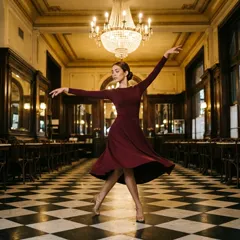
She spins slowly in the spotlight, her skirt swirling around her
 15 s
She dances across the checkered floor, turning gracefully as the camera slowly follows her
Make characters move
Cartoons, anime and 3D characters keep their own style while they sing, cook or look around.
10 sThe cat sings into the microphone, eyes closed, swaying to the music
 10 s
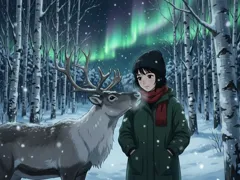
The northern lights ripple across the sky, the reindeer nuzzles her and she smiles
 5 s
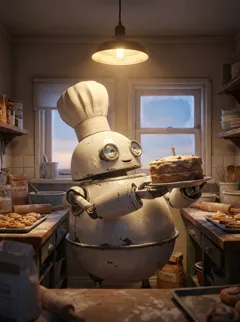
The robot chef stirs the pot, steam rising from the stove
 5 s
The volcano cake erupts, chocolate lava bubbling down its sides
Animals
Fur, feathers and water move the way they should, in slow motion if you ask.
 5 s
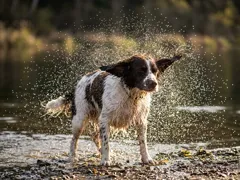
The dog shakes the water off its fur in slow motion, droplets flying
 5 s
The little bird fluffs its feathers and hops along the branch as snow falls
 10 s
The countryside rushes past the window, the dog's ears flapping in the wind
 15 s
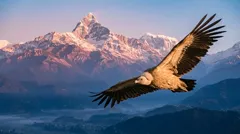
The bird glides over the snowy peaks, the camera following it through the sky
Scenes and camera moves
Ask the camera to follow, circle or move closer, and the whole scene moves with it.
 5 s
The rocket lifts off in a burst of fire and smoke, lighting up the clouds
 5 s
Waves crash against the rocks, spray glowing in the sunset
 10 s
The red car drives along the winding mountain road as the camera tracks it
 15 s
The camera slowly pushes toward the lighthouse as the ocean pours over the edge of the world
5, 10 or 15 seconds
A video starts at 5 seconds. Pick 10 or 15 for a longer scene: each 5 seconds costs 3 edit credits, and the button shows the total before you start.
- 5 seconds, 3 credits
- 10 seconds, 6 credits
- 15 seconds, 9 credits
Trusted by


How to turn an image into a video
Add a picture
Upload a photo or any image. No picture? Describe the scene and Craiyon makes the video from your words.
Say what moves
Write the motion in your own words: who does what, and how the camera moves. Or keep “Animate it” and let the video choose.
Pick a length and animate
Choose 5, 10 or 15 seconds and press Animate. Download your video, or try other words on the same picture.
Frequently Asked Questions
How do I turn an image into a video?
Add a photo or any picture, write what should move (for example “She turns and smiles”) and press Animate. The video is usually ready in less than a minute: download it, or try other words on the same picture.Can I make a video from words alone?
Yes. Without a picture, describe the scene and what happens in it (for example “A fox running through fresh snow at dawn”), pick the length and the shape (Auto, Square, Landscape or Portrait) and press Create video. It uses the same credits as a video from a picture.How long can a video be?
5, 10 or 15 seconds. Every video starts at 5 seconds; pick 10 or 15 before you press Animate for a longer scene.How many credits does a video use?
3 edit credits for each 5 seconds: 3 for 5 seconds, 6 for 10 and 9 for 15. The button shows the total before you start, and a video that fails uses none. Edit credits come with every paid plan.Do the videos have sound?
Yes. Each video comes with sound that fits the scene: music, a voice, waves or an engine.Which pictures can I animate?
Photos, drawings, paintings, anime or 3D: any JPG, PNG or WebP image up to 10 MB from your phone or your computer, or any image you made on Craiyon. A very wide or very tall picture is cropped to a shape the video can use.Will the video keep the face and the style of my picture?
The video starts from your picture and keeps its faces, clothes and style. Big movements can change a detail; if one drifts, ask for a gentler motion or try again.