

'%3e%3cpath%20d='M12%2020.3333C16.6024%2020.3333%2020.3333%2016.6024%2020.3333%2012C20.3333%207.39762%2016.6024%203.66666%2012%203.66666C7.39763%203.66666%203.66667%207.39762%203.66667%2012C3.66667%2016.6024%207.39763%2020.3333%2012%2020.3333Z'%20stroke='%23F2F2F2'%20stroke-width='2.08333'%20stroke-linecap='round'%20stroke-linejoin='round'/%3e%3cpath%20d='M8.66667%2013.6667C8.66667%2013.6667%209.91667%2015.3333%2012%2015.3333C14.0833%2015.3333%2015.3333%2013.6667%2015.3333%2013.6667'%20stroke='%23F2F2F2'%20stroke-width='2.08333'%20stroke-linecap='round'%20stroke-linejoin='round'/%3e%3cpath%20d='M9.5%209.5H9.50833'%20stroke='%23F2F2F2'%20stroke-width='2.08333'%20stroke-linecap='round'%20stroke-linejoin='round'/%3e%3cpath%20d='M14.5%209.5H14.5083'%20stroke='%23F2F2F2'%20stroke-width='2.08333'%20stroke-linecap='round'%20stroke-linejoin='round'/%3e%3c/g%3e%3cdefs%3e%3cclipPath%20id='clip0_10282_1064'%3e%3crect%20width='20'%20height='20'%20fill='white'%20transform='translate(2%202)'/%3e%3c/clipPath%3e%3c/defs%3e%3c/svg%3e)


Network diagram showing VPC, subnets, NAT gateway, and servers like Squid, Jump Host, and Splunk.
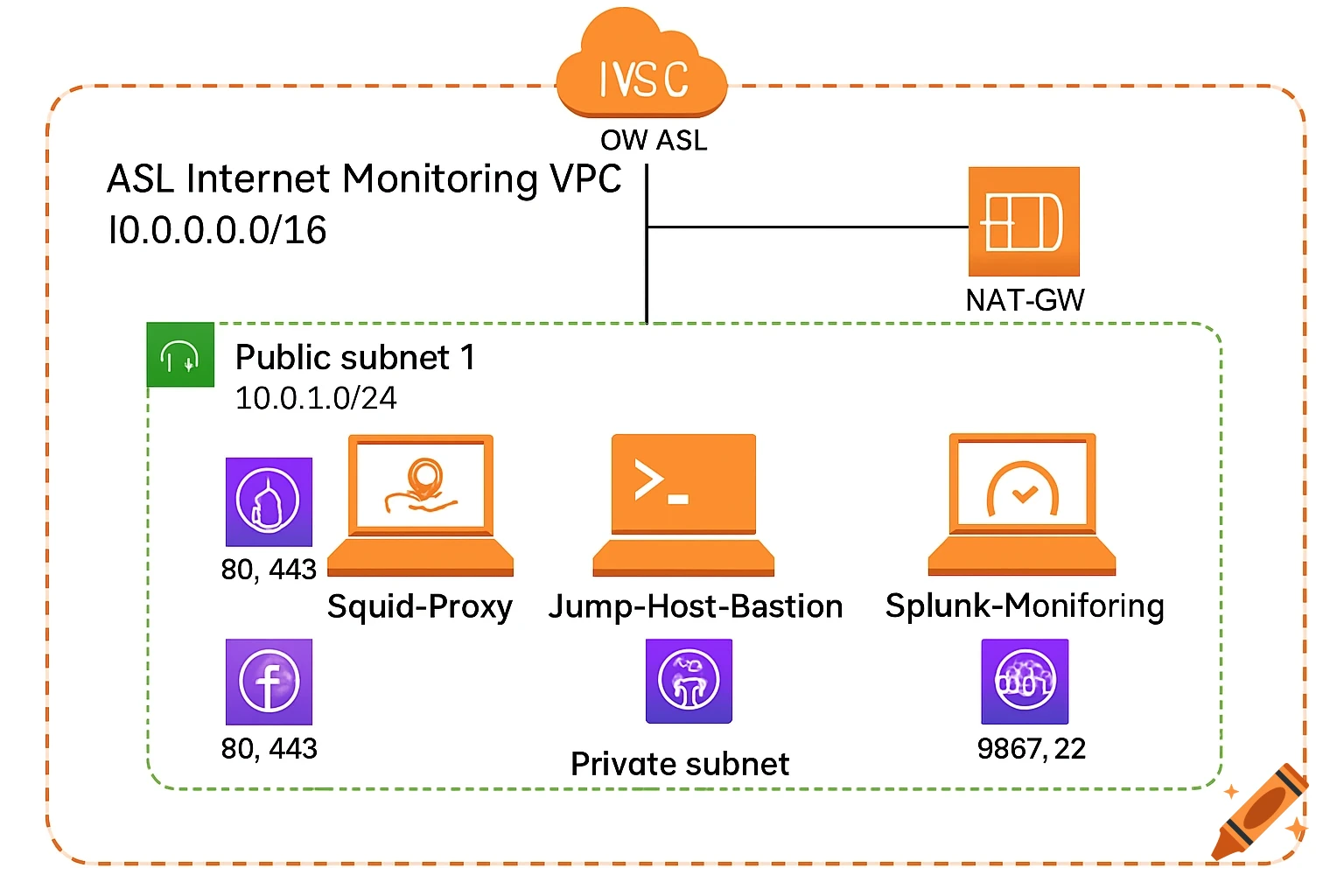
**Network Diagram Description for AI Generation:** **1. AWS VPC (Virtual Private Cloud):** - **Label:** `ASL Internet Monitoring VPC` - **CIDR Block:** `10.0.0.0/16` - **Components:** - **Internet Gateway (IGW):** Attached to the VPC for public internet access. Label: `IGW-ASL`. - **NAT Gateway:** Placed in the public subnet to allow private subnet resources to access the internet. Label: `NAT-GW`. --- **2. Subnets:** - **Public Subnet 1:** - **CIDR:** `10.0.1.0/24` - **Availability Zone:** `ap-southeast-2a` (or your preferred AWS region). - **Components:** - **Squid Proxy Server (Linux):** - **Label:** `Squid-Proxy` - **Security Group:** - Allows **HTTP (80)/HTTPS (443)** inbound from private subnet CIDR. - Allows **outbound** traffic to Splunk server (Port 8089) and the internet. - **Role:** Routes all web traffic from private subnet clients, logs traffic to Splunk. - **Jump Host Server (Linux):** - **Label:** `Jump-Host-Bastion` - **Security Group:** - Allows **SSH (22)** and **RDP (3389)** inbound from trusted admin IP ranges. - Allows outbound to private subnet (for administrative access). - **Role:** Bastion host for admins to access private instances via SSH/RDP. - **Splunk Server (Linux):** - **Label:** `Splunk-Monitoring` - **Security Group:** - Allows **TCP 9997** (Splunk forwarder) inbound from Squid and Windows clients. - Allows **SSH (22)** from Jump Host. - **Role:** Ingests proxy and client logs, generates real-time alerts for forbidden URLs. - **Private Mehr sehen
More images like this
